Posts

Showing posts with the label GADGET REPAIR TRICKS

Removing Ads Without Data Loss Using TSMPro

Image
Open TSMPro Log into your account Select General Tab Activate ADB tools from phone settings Select ADB tools Click execute Tab.

Techno Spark 5 Pro Google Account Bypass

Image
   PROCEDURES: 1. Open unlocktool 2.Log-in your unlocktool account 3. Select TECNO tab. 4. Select model Techno Spark 5 Pro. 5. Click brom erase frp 6.  Hold vol+ and vol- 7. Done!

Samsung A11 A115f Google Account Bypass Unlocktool.

Image
  PROCEDURES: 1. Open Unlocktool 2. Log-in your Unlocktool account 3. Select Samsung Tab 4. Select model select A11 Snapdragon 450 5. Click EDL erase frp 6. Set the testpoint area 7. Done!

Vivo V19 Neo Password and Google Account Unlocktool.

Image
  PROCEDURES: 1. Open unlocktool 2.L og-in your unlocktool account 3. Select Vivo tab 4. Select model V19 Neo 5. Click brom erase password and frp 6.  Hold vol+ and vol- 7. Done!

Redmi A2 Plus Password and Google Account Removal

Image
PROCEDURES: 1. Open unlocktool 2.L og-in your unlocktool account 3. Select MI tab 4. Select model Xiaomi Redmi A2 5. Click brom erase frp 6.  Hold vol+ and vol- 7. Done!

Samsung A6+ A605f Google Account Bypass.

Image
PROCEDURES: Download combination file  here. Get firmware  here. Get the latest Odin flasher and Samsung USB driver  here. Install USB driver. Open Odin flasher and assign the combination file to AP like the picture below.  .  Go to download mode by pressing volume up+down and insert USB, then press  volume up to enter download mode.  When the Odin  flasher detected the handset press Start.  After flash, open Settings and enable OEM to off the FRP. Now, the handset is ready for full flashing. Set to download mode again and proceed to full firmware upgrade using Odin flasher. The tutorial was only tested for binary 1 firmware... 

Lenovo PB1-770M Hang On Logo

Image
PROCEDURES: Download firmware files  here. Download flasher  here . Big credits to this video for the wonderful tutorials. Good and tested solution.

OPPO A1601 Clone Hang On Logo

Image
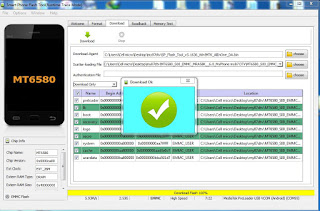
   PROCEDURE Get the firmware here . Credits to the owner Password: gsmtech Download SpFlashTool. Install MTK Android USB driver Extract the firmware Open Sp-FlashTool  Assign the scatter file to Scatter Loading tab. Choose Download or Firmware Download  Insert USB cable to the device Wait until "Download Ok" box appear

Myphone MY87 DTV Hang on Logo.

Image
                                                                                PROCEDURE Get the firmware here . Get the flasher here  . Install MTK Android USB driver Extract the firmware Open Sp-FlashTool  Assign the scatter file to Scatter Loading tab. Choose Download or Firmware Download  Insert USB cable to the device Wait until "Download Ok" box appear

Acer E700 Triple Sim Auto Restarting.

Image
PROCEDURE Get the firmware here . Install MTK Android USB driver Extract the firmware Open Sp-FlashTool  Assign the scatter file to Scatter Loading tab. Choose Download or Firmware Download  Insert USB cable to the device Wait until "Download Ok" box appear

BS Mobile Atomic Edge Blue Screen Fixed.

Image
PROCEDURES: Get the firmware  here . Password is  http://ghpforum.com Install MTK Android USB driver Extract the firmware Open Sp-FlashTool  Assign the scatter file to Scatter Loading tab. Choose Download or Firmware Download  Insert USB cable to the device Wait until Download Ok box appear

Cherry Mobile Quartz Hang On Android Logo Fixed.

Image
PROCEDURES: Get the firmware here . Install MTK Android USB driver Extract the firmware Open Sp-FlashTool  Assign the scatter file to Scatter Loading tab. Choose Download or Firmware Download  Insert USB cable to the device Wait until Download Ok box appear.

Lenovo A319 hang On Logo Solved.

Image
PROCEDURES: Get the firmware here . Install MTK Android USB driver Extract the firmware Open Sp-FlashTool  Assign the scatter file to Scatter Loading tab. Choose Download or Firmware Download  Insert USB cable to the device Wait until Download Ok box appear.

HappyMobile Magic Hang On Logo.

Image
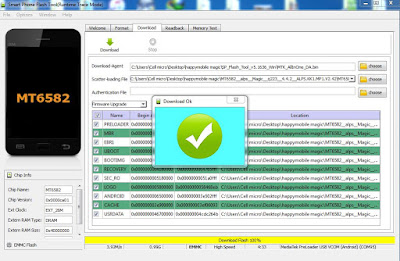
PROCEDURES: Get the firmware  here . Install MTK Android USB driver Extract the firmware Open Sp-FlashTool  Assign the scatter file to Scatter Loading tab. Choose Download or Firmware Download  Insert USB cable to the device Wait until Download Ok box appear.

SKK Aura Spark Virus Infected Solved.

Image
PROCEDURES Get the Pac File here . Password is edelson2190. Download UpgradeDownload Open Upgrader  Follow the number marked in the image shown below Click the number 1 to load the Pac file Press volume up or down steady Click number 2 to start downloading Credits to the file owner from GsmSandwich

Star Mobile Knight Vision "Auto Download Apps", Fixed!

Image
PROCEDURES: Get the firmware and flasher HERE  at NEEDROM. Install MTK Android USB driver Extract the firmware Open Sp-FlashTool  Assign the scatter file to Scatter Loading tab. Choose Download or Firmware Download  Insert USB cable to the device Wait until Download Ok box appeard

O+ 360 Alpha Virus Infected, Fixed!

Image
PROCEDURES: Get the firmware and flasher HERE. . Install MTK Android USB driver Extract the firmware Load Flash Tool. Open Sp-FlashTool and assign the scatter file to Scatter Loading tab. Click Download and insert USB cable to the device.

Cherry Mobile Fusion Aura Hang on Logo

Image
PROCEDURES: Get the full firmware and flasher here.  Credits to the owner. Install the drivers and flasher found at extracted folder. Assign the .img file at image tab. Proceed to upgrade and follow the guide below.

Kata T4 Tablet No Power/ Fixed!

Image
PROCEDURES Get the firmware  here.  Password "anT4". Credits to the files owner. Install MTK Android USB driver Extract the firmware. Load Flash Tool. Open Sp-FlashTool and assign the scatter file to Scatter Loading tab. Click Download and insert USB cable to the device. Note: Be sure the tablet was detected by USB port before flashing

Cherry Mobile Flare S5 Mini Hang on Logo, Fixed!

Image
PROCEDURES Get the Pac File here .  Download UpgradeDownload Open Upgrader  Follow the number marked in the image shown below Click the number 1 to load the Pac file Click number 2 to start downloading